IP to Hostname: How to Find a Domain by IP Address (2026)

As of Q1 2026, there are 3.687 billion allocated IPv4 addresses on the public internet, of which roughly 3.117 billion are actively routed through the global BGP system (APNIC Blog, January 2026). Behind each of those addresses is a server, a router, or a device — and often a human-readable hostname that tells you exactly who or what it belongs to. But finding that hostname from a bare IP address isn’t obvious if you don’t know where to look.
That’s what a reverse DNS lookup — also called an IP to hostname lookup — solves. It queries the part of DNS infrastructure where IP addresses map backward to domain names, returning a result like mail.example.com or ec2-54-100-1-1.compute.amazonaws.com from nothing more than a numeric IP. The result can tell you whether an IP belongs to a mail server, a web host, a CDN edge node, a residential ISP block, or something altogether more suspicious.
This guide explains how reverse DNS works, walks through four free methods for running a hostname lookup right now, and covers the practical cases where it matters most — including why your own mail server’s hostname can mean the difference between inbox and spam folder.
Key Takeaways
- In Q1 2026, 3.687 billion IPv4 addresses are allocated globally — each can have a PTR record mapping it to a hostname (APNIC, 2026).
- PTR records account for 3.58% of all DNS queries — over 4 billion reverse lookups per day on a single resolver network (Vercara, March 2024).
- Since February 1, 2024, Google requires a valid PTR record for all email senders; missing one risks outright rejection by Gmail.
- The SeoPerc IP to Hostname tool returns results in seconds — no command line or account needed.
- A blank reverse lookup result means no PTR record was configured, not that the IP doesn’t exist.
What Is Reverse DNS — and How Is It Different from a Regular DNS Lookup?
In March 2024, Vercara’s UltraDNS network processed 3.84 trillion DNS queries in a single month — averaging 123.89 billion queries per day — and PTR (pointer) records accounted for 3.58% of every query in that dataset (Vercara DNS Analysis Report, March 2024). That’s over 4.4 billion reverse DNS lookups per day on a single resolver network. Reverse DNS isn’t an obscure edge case — it’s baked into how the internet operates every hour of every day.
Standard (forward) DNS works like a phone book: you give it a name — example.com — and it returns a number (the IP address). Reverse DNS flips that entirely. You give it an IP address, and it returns the hostname. The two systems use completely separate DNS zones. Reverse lookups for IPv4 addresses run through the in-addr.arpa zone, and the IP is written backwards. To look up 192.0.2.1, DNS queries 1.2.0.192.in-addr.arpa. The PTR record at that address holds the hostname.
In March 2024, Vercara’s UltraDNS network processed 3.84 trillion DNS queries in a single month — 123.89 billion per day — and PTR records accounted for 3.58% of all query types. Most of those reverse lookups were triggered automatically by mail servers, security systems, and network monitoring tools, not humans at a terminal. At Cloudflare’s 1.1.1.1 resolver, which processes 4.3 trillion DNS queries per day globally, the PTR share applies similarly — meaning billions of reverse lookups happen every 24 hours without most users ever knowing. (Vercara DNS Analysis Report, March 2024)
Why Would You Need to Find a Hostname from an IP Address?
In 2025, DNSFilter’s annual security report found that 1 in every 174 DNS requests is malicious — up from roughly 1 in 1,000 in prior years — and that 79% of cyberattacks utilize DNS at some stage of their execution (DNSFilter Annual Security Report, January 2025). Reverse DNS lookups are a frontline triage tool for anyone who needs to understand what an IP address actually represents before acting on it.
So what are the most common reasons people run IP to hostname lookups in practice?
- Email deliverability troubleshooting: Mail isn’t being delivered, or incoming messages are failing authentication checks. A reverse lookup on the sending IP confirms whether it belongs to the claimed sender’s legitimate infrastructure — or whether something unexpected is relaying on their behalf.
- Server log analysis: Web server access logs record raw IP addresses. Converting them to hostnames reveals whether traffic comes from legitimate users, known crawlers like Googlebot, CDN edge nodes, or datacenter ranges associated with scraping and abuse.
- Security investigations: An IP appeared in a firewall alert or SIEM event. A hostname lookup quickly tells you whether it belongs to a cloud provider (AWS, Google Cloud, Azure), a corporate network, a residential ISP, or a range with no hostname at all — which itself is worth noting.
- Network diagnostics: Running an online traceroute returns a series of IP hops. Resolving those IPs to hostnames makes the route readable — you can see which ISPs, exchange points, and datacenters a packet passes through on its way to the destination.
- Verifying your own server setup: Before sending email from a new server or IP, confirming your outbound IP resolves to the expected hostname — and that hostname resolves back to the same IP — prevents deliverability problems before they start.
Don’t know your server’s outbound IP? The What’s My IP tool shows your current public IP with ISP and location details, which you can feed directly into a reverse DNS lookup.
How to Find a Hostname from an IP Address: 4 Free Methods
As of Q1 2025, 368.4 million domain names are registered globally across all top-level domains, up 1.7% year-over-year. Each domain maps to at least one IP address — and the four methods below cover every situation, from a quick browser-based check to a raw DNS query on the command line.
Method 1: Use a Free Online Tool — No Installation Required
This is the fastest option. It works on any phone or desktop in under 10 seconds, no terminal or technical knowledge needed.
- Open the SeoPerc IP to Hostname tool.
- Paste the IP address into the input field. IPv4 and IPv6 both work.
- Click Check. The tool queries the
in-addr.arpaPTR record server-side and returns the hostname within seconds. - If the IP has multiple PTR records — some IPs do — the tool lists them all.
SeoPerc IP to Hostname tool result example:
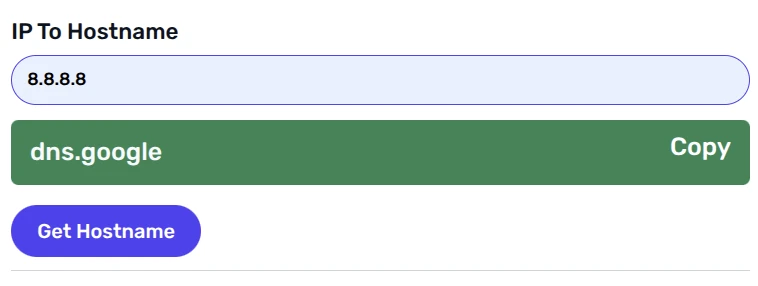
Want to verify the result by going the other direction? The companion Hostname to IP tool resolves any domain name back to its IP — useful for confirming FCrDNS (forward-confirmed reverse DNS) consistency, which Google requires for email senders.Free Reverse DNS Lookup
Run an instant IP to hostname lookup — no account needed.Try IP to Hostname →
Method 2: Command Line (nslookup / host / dig)
For developers and sysadmins who prefer a terminal:
- Windows:
nslookup 8.8.8.8— returns the PTR record hostname and the authoritative nameserver that answered. - Linux / macOS:
host 8.8.8.8— simpler output, returns the PTR record in a single line. - dig (Linux / macOS):
dig -x 8.8.8.8— full DNS response with TTL, flags, and the authoritative server name.
For 8.8.8.8 (Google’s public DNS resolver), the PTR record returns dns.google. If a reverse lookup returns NXDOMAIN, no PTR record was configured for that IP.
Method 3: Get Full IP Context with IP Information
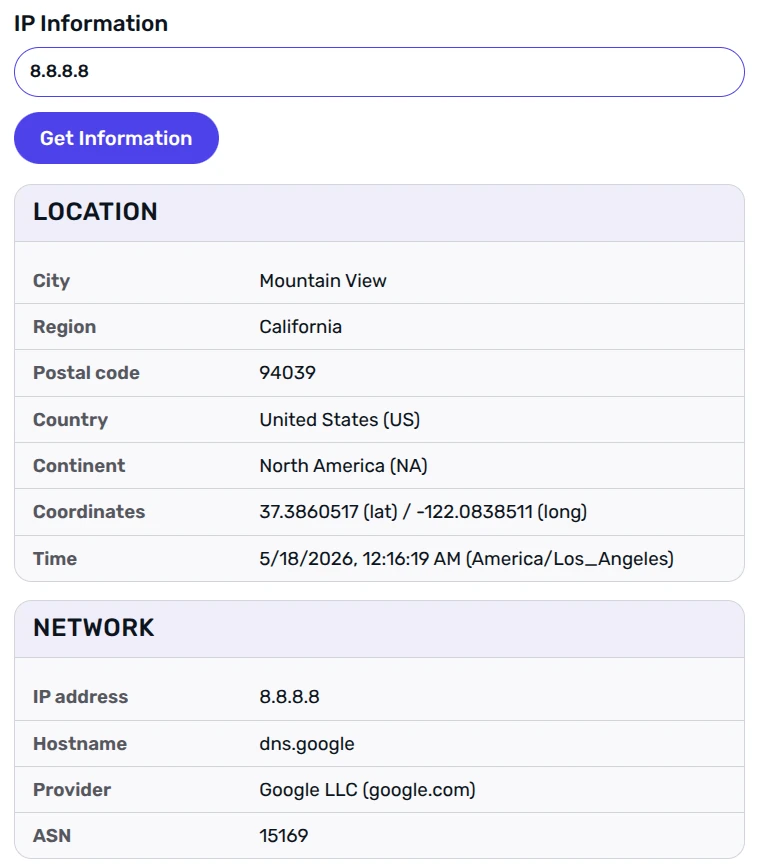
A hostname alone doesn’t always tell the complete story. The SeoPerc IP Information tool pairs the reverse DNS hostname with ISP name, organization, ASN, country, city, and connection type in a single lookup. This is particularly useful for server log analysis — instead of just knowing what a hostname is, you can see whether that IP belongs to a known cloud provider, a residential ISP, a corporate network, or an anonymous hosting range.
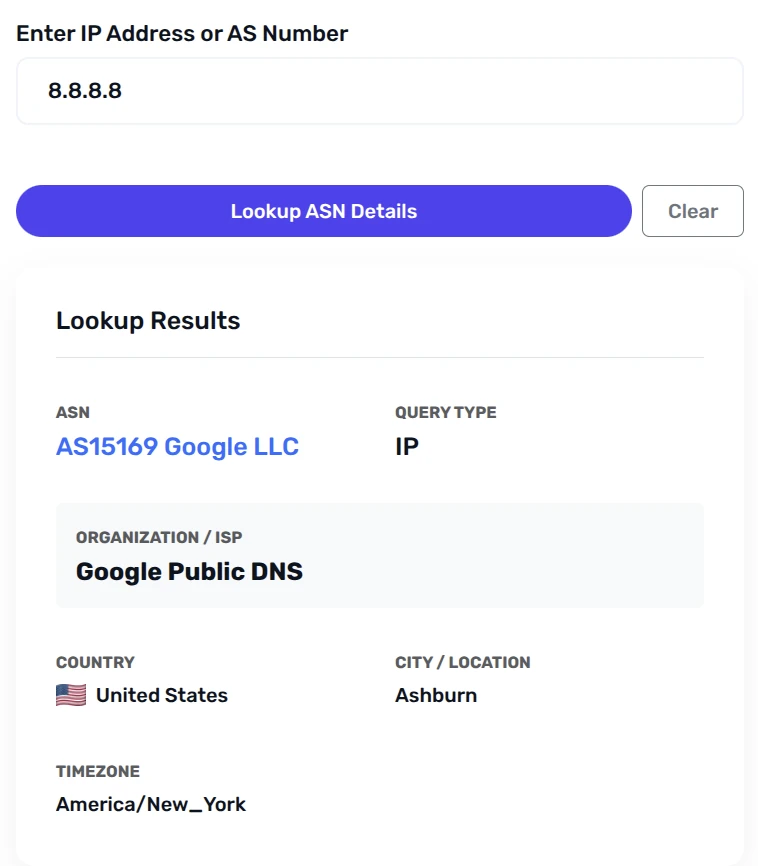
For a pure ASN-level view — which organization controls an entire IP block — the ASN Lookup tool identifies the Autonomous System owning any IP range, along with the AS name, country, and all assigned prefixes.
ASN Lookup tool result example:
Method 4: Query the PTR Record Directly via DNS Lookup
For advanced users who want the raw DNS record: the SeoPerc DNS Lookup tool can query any record type, including PTR. Enter the reversed IP in in-addr.arpa format — for IP 1.2.3.4, query 4.3.2.1.in-addr.arpa and select record type PTR. The tool returns the raw DNS response with TTL and authoritative nameserver, which is useful when diagnosing misconfigured reverse DNS zones or confirming delegation status.
Why Do Some IP Addresses Return No Hostname?
In January 2026, APNIC’s analysis of BGP routing tables found that of 3.687 billion allocated IPv4 addresses, roughly 570 million — about 16% — aren’t publicly routed at all (APNIC Blog, January 2026). And of the IPs that are routed, many still have no PTR record. A blank reverse lookup result is the norm in large swaths of the internet, not the exception. Here’s why:
- No PTR record configured: PTR records aren’t automatic. A network administrator must deliberately create one in the reverse DNS zone. Many servers — especially newly provisioned cloud instances — ship without a PTR record. Consumer IP addresses (home broadband, mobile data) typically lack them too, because residential ISPs don’t configure PTR records for individual subscribers by default.
- Reverse DNS zone not delegated: Even if a server owner wants to set a PTR record, they can only do so if their ISP or hosting provider has delegated control of the reverse DNS zone to them.
- IPv6 deployment gap: IPv6 reverse DNS uses
ip6.arparather thanin-addr.arpa, and the full reversed address notation is significantly longer and more complex to configure. - Intentional omission: Some operators deliberately leave PTR records blank. A hostname makes a server’s purpose and ownership visible to anyone who runs a reverse lookup. For privacy-sensitive infrastructure, leaving it blank is a deliberate choice.
What a blank result actually tells you: When a reverse lookup returns nothing, treat it as a signal rather than a dead end. IPs with no PTR record fall into a few distinct categories: unconfigured cloud instances (very common), residential NAT addresses (extremely common), privacy-motivated operators (deliberate), or threat actors who strip PTR records to reduce traceability. Context from the IP Information tool — ISP name, ASN, connection type — can often disambiguate these cases even when the PTR record itself is missing.
IP Information result example:
For IPv6 addresses, the IP Subnet Calculator handles both IPv4 CIDR and IPv6 subnets — useful when you need to identify the address range an IP belongs to before querying its PTR record, since IPv6 notation is far less intuitive than IPv4.
Why Your Mail Server’s Hostname Directly Affects Email Delivery
Since February 1, 2024, Google requires all email senders — with mandatory enforcement for bulk senders sending 5,000 or more messages per day — to have a valid PTR record for their sending IP, with that PTR resolving to a hostname that forward-resolves back to the same IP. Gmail now rejects or permanently defers messages from IPs that fail this check. Yahoo and Microsoft apply equivalent reverse DNS requirements for inbound mail.
What does a correctly configured mail server PTR record look like? If your outbound IP is 198.51.100.25 and your sending domain is example.com, the PTR record at 25.100.51.198.in-addr.arpa should resolve to mail.example.com — and mail.example.com must have an A record pointing back to 198.51.100.25. That bidirectional match is FCrDNS. It isn’t enough for the PTR to exist; the forward record must agree.
The quickest way to confirm your own setup with the SeoPerc network tools:
- Use What’s My IP to identify your server’s outbound IP address.
- Run that IP through the IP to Hostname tool — confirm a PTR record exists and returns the hostname you expect.
- Paste that hostname into the Hostname to IP tool — confirm it resolves back to the same IP (FCrDNS confirmed).
- Run your IP through the IP Blacklist Check and Email Blacklist Check to verify you’re not listed on any DNSBL that would cause rejections independently of your PTR configuration.
This four-step check covers every major deliverability variable a mail server admin needs to verify before launching a campaign or diagnosing bounces. It takes under two minutes and requires no software installation.
Frequently Asked Questions
What is an IP to hostname lookup?
An IP to hostname lookup — also called a reverse DNS lookup — translates a numeric IP address into the human-readable domain name assigned to that server. It queries the in-addr.arpa DNS zone, which stores PTR records mapping IPs to hostnames. Unlike a forward DNS lookup (domain → IP), a reverse lookup goes IP → hostname. The SeoPerc IP to Hostname tool performs this lookup for any IPv4 or IPv6 address in seconds — no account or software required.
Do all IP addresses have a hostname?
No. PTR records are optional — a server owner must deliberately configure one in the reverse DNS zone delegated by their ISP or hosting provider. Many consumer addresses, cloud instances, and privacy-focused servers have no PTR record. A blank reverse lookup doesn’t mean the IP is invalid; it means no PTR record was set. As of 2026, about 16% of allocated IPv4 addresses aren’t publicly routed at all (APNIC, 2026), so a blank result is common.
How do I look up a hostname from an IP address for free?
The fastest no-install option is the SeoPerc IP to Hostname checker — paste the IP, get the result in seconds. On the command line: nslookup <IP> on Windows, or host <IP> on Linux/macOS. For the hostname plus ISP name, ASN, country, and connection type in one view, use the IP Information tool instead.
What is a PTR record?
A PTR (Pointer) record is the DNS record type that maps an IP address to a hostname. For IPv4, it lives in the in-addr.arpa zone with the IP written backwards: 192.0.2.1 is looked up as 1.2.0.192.in-addr.arpa. For IPv6, the equivalent is the ip6.arpa zone. You can query any PTR record directly using the SeoPerc DNS Lookup tool — select record type PTR and enter the reversed IP address in in-addr.arpa format.
Why does my mail server need a PTR record?
Since February 1, 2024, Google requires all sending IPs to have a valid PTR record that forward-resolves back to the same IP (FCrDNS). Without it, Gmail rejects or permanently defers your messages — regardless of SPF, DKIM, or DMARC. Yahoo and Microsoft enforce similar checks. Before sending any campaign, verify your setup: run your sending IP through IP to Hostname and check it against the Email Blacklist Check.
Every IP Has a Story — Find It in Seconds
With 3.687 billion IPv4 addresses allocated globally, 368 million registered domains, and DNS processing over 4 trillion queries per day, the link between an IP address and the server behind it is concrete, queryable, and often tells you exactly what you need to know. Whether you’re investigating a suspicious connection, diagnosing a mail delivery problem, or simply curious what a server belongs to — a reverse DNS lookup is the starting point.
Google’s February 2024 enforcement made PTR records a baseline requirement for email senders, not just a nice-to-have. And for everyone else, a 10-second reverse lookup turns an opaque IP into a readable identity. Run your first lookup now with the SeoPerc IP to Hostname tool. For a complete picture, follow it with IP Information — and if email deliverability is the concern, add the Email Blacklist Check.
Comments (0)
Sign in to join the discussion
Sign in