How to Upgrade Debian 11 to Debian 12 Bookworm: A Comprehensive Guide

Upgrading your Debian system from version 11 (Bullseye) to version 12 (Bookworm) ensures you have the latest features, security updates, and performance improvements. This comprehensive guide will walk you through the upgrade process step-by-step, providing tips to make the transition as smooth and efficient as possible.
Table of Contents
- Prerequisites
- Backup Important Data
- Update Existing Packages
- Update Repository Sources
- Perform the System Upgrade
- Post-Upgrade Tasks
- Efficient Tips for a Smooth Upgrade
- Conclusion
Prerequisites
Before initiating the upgrade, ensure you have:
- Root or Sudo Access: Administrative privileges to execute system-level commands.
- Stable Internet Connection: A reliable connection to download packages.
- Sufficient Disk Space: At least 10 GB of free space is recommended.
Backup Important Data
Before any major upgrade, backing up your data is crucial. Use tools like rsync, tar, or third-party backup solutions to safeguard your files.
sudo tar -cvpzf backup.tar.gz --exclude=/backup.tar.gz --one-file-system /Tip: Store the backup on an external drive or remote server.
Update Existing Packages
Ensure your current system is up-to-date.
sudo apt update
sudo apt upgrade -y
sudo apt full-upgrade -yRemove unnecessary packages:
sudo apt autoremove --purge -yUpdate Repository Sources
Modify your package repository sources to point to Debian 12 (Bookworm).
Step 1: Backup Current Sources List
sudo cp /etc/apt/sources.list /etc/apt/sources.list.bakStep 2: Edit Sources List
Open the sources.list file with your preferred text editor.
sudo nano /etc/apt/sources.listStep 3: Replace Bullseye with Bookworm
Change all instances of bullseye to bookworm. For example:
From:
deb http://deb.debian.org/debian/ bullseye main contrib non-free
deb-src http://deb.debian.org/debian/ bullseye main contrib non-freeTo:
deb http://deb.debian.org/debian/ bookworm main contrib non-free
deb-src http://deb.debian.org/debian/ bookworm main contrib non-freeSave and close the file. The easiest way to change the file is by using this command ‘find and replace’ bullseye with bookworm as follows:
sudo sed -i'.bak' 's/bullseye/bookworm/g' /etc/apt/sources.list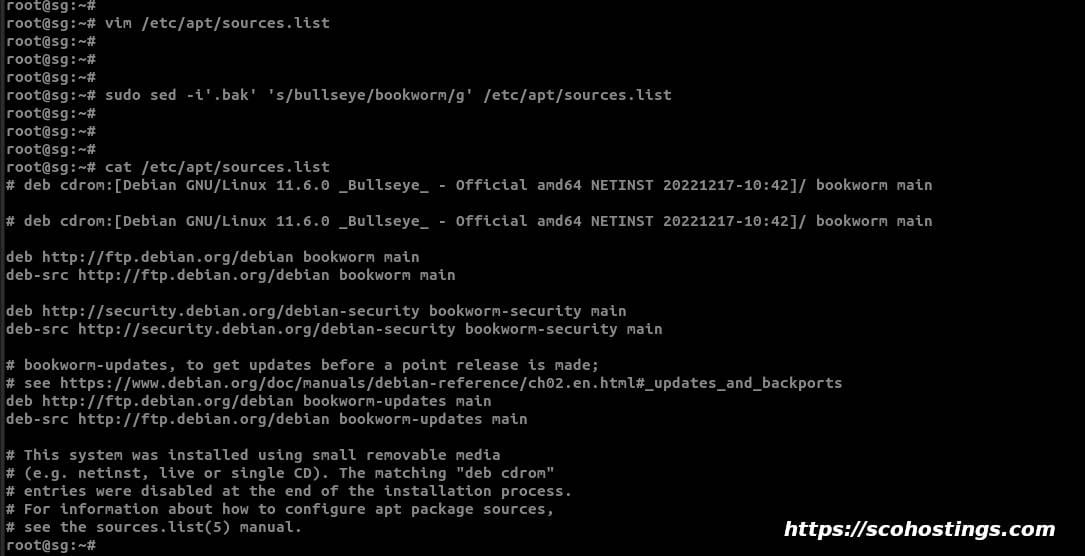
If you have additional repositories, update them accordingly or comment them out if they are not yet available for Debian 12.
Perform the System Upgrade
Step 1: Update Package Lists
sudo apt updateStep 2: Perform Minimal System Upgrade
This step helps to avoid removing important packages.
sudo apt upgrade --without-new-pkgsStep 3: Perform Full Upgrade
sudo apt full-upgrade -yStep 4: Reboot the System
sudo rebootPost-Upgrade Tasks
Verify Debian Version
After rebooting, confirm the upgrade was successful.
lsb_release -aExpected Output:
Distributor ID: Debian
Description: Debian GNU/Linux 12 (bookworm)
Release: 12
Codename: bookwormCheck for Held Packages
Ensure no packages were held back during the upgrade.
sudo apt-mark showholdIf there are held packages, you can try to install them manually:
sudo apt install package-nameClean Up
Remove obsolete packages and clear the cache.
sudo apt autoremove --purge -y
sudo apt cleanEfficient Tips for a Smooth Upgrade
- Read Release Notes: Review the Debian 12 Release Notes for any specific instructions or known issues.
- Disable Third-Party Repositories: Temporarily disable or remove non-official repositories to prevent conflicts.
- Check System Health: Run
sudo apt update && sudo apt upgradeto ensure there are no pending updates or broken dependencies before starting. - Monitor Disk Space: Use
df -hto check available disk space and free up space if necessary. - Use Screen or Tmux: If upgrading over SSH, use
screenortmuxto prevent disruptions in case of a connection loss.
sudo apt install screen -y
screen- Review Configuration Files: Be cautious with prompts to replace configuration files. Review differences to avoid overwriting important settings.
- Test Upgrade in a Virtual Machine: If possible, simulate the upgrade in a VM to identify potential issues.
Conclusion
Upgrading from Debian 11 to Debian 12 Bookworm is a straightforward process when following best practices. By preparing adequately and following the steps outlined in this guide, you can upgrade your system efficiently while minimizing risks.
Remember: Always back up your data and read official documentation when in doubt.
- #Debian 12 upgrade guide
- #Debian Bookworm
- #Debian Bookworm upgrade
- #Debian upgrade
- #Linux upgrade guide
- #System Administration
- #Upgrade Debian 11 to 12
- #Upgrade Debian 11 to Debian 12
Comments (0)
Sign in to join the discussion
Sign in

