IP to Hostname Converter Tool: Free Reverse DNS Lookup by SeoPerc (2026 Updated Guide)

In the world of networking, web development, and digital marketing, knowing exactly what’s behind an IP address can save hours of troubleshooting. That’s where the IP to Hostname converter (also known as a reverse DNS lookup tool) comes in.
SeoPerc’s completely free IP to Hostname tool at https://seoperc.com/tool/ip-to-hostname lets you instantly turn any public IP address into its associated hostname — no software to install, no sign-up required.
Whether you’re a system administrator, SEO specialist, developer, or cybersecurity enthusiast, this simple yet powerful tool belongs in your daily toolkit. Below you’ll find everything you need: what it is, how to use it, exactly how it works, real-world use cases, and a complete FAQ.
What Is an IP to Hostname Converter?
An IP to Hostname converter performs a reverse DNS (rDNS) lookup. While a normal DNS lookup turns a domain name into an IP (e.g., google.com → 142.250.190.78), the reverse process does the opposite: it takes an IP address and returns the registered hostname.
SeoPerc’s tool queries the DNS PTR (Pointer) record for any IPv4 or IPv6 address and returns the clean hostname in milliseconds.
It’s 100% free, works directly in your browser, and is part of SeoPerc’s growing suite of 50+ SEO & networking utilities (including Hostname to IP, DNS Lookup, IP Information, Ping, and Traceroute).
How to Use the SeoPerc IP to Hostname Tool (Step-by-Step)
Using the tool is ridiculously easy — even if you’ve never done a DNS lookup before:
- Go to → https://seoperc.com/tool/ip-to-hostname
- In the single input box, type or paste any IP address (example:
8.8.8.8or2001:4860:4860::8888). - Click the big blue “Get Hostname” button.
- The result appears instantly below (e.g., dns.google).
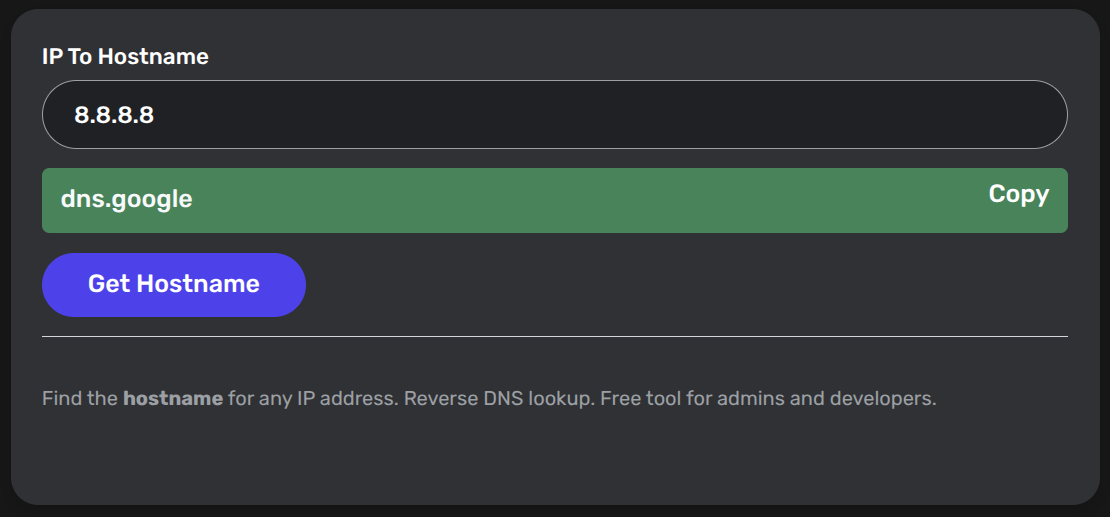 SeoPerc IP To Hostname Tool
That’s it! No CAPTCHA, no waiting, no limits on daily usage.
How the IP to Hostname Tool Actually Works (Technical Breakdown)
Here’s the magic behind the scenes (without the boring jargon):
- You enter an IP address (e.g.,
192.0.2.1). - The tool automatically reverses the octets and appends the special domain
.in-addr.arpa(for IPv4) or.ip6.arpa(for IPv6).
Ex.:192.168.0.1→1.0.168.192.in-addr.arpa - It sends a DNS query asking for the PTR record of that special domain.
- Authoritative DNS servers reply with the registered hostname (if one exists).
- SeoPerc displays the clean result.
If no PTR record is configured (very common with dynamic residential IPs), the tool will clearly tell you “No hostname found” or return the IP itself.
The entire process happens in real time via public DNS resolvers — no data is stored and your queries stay private.
What Can You Use the IP to Hostname Tool For? (Real-World Applications)
Here are the top 10 practical ways professionals use this exact tool every day:
- Network troubleshooting — Quickly identify which server or device an IP belongs to.
- Email server verification — Check if an email-sending IP has a proper reverse DNS (critical for deliverability & avoiding spam filters).
- Security audits & threat hunting — See if a suspicious IP resolves to a known hosting provider, VPN, or botnet.
- Log file analysis — Turn raw IP logs from Apache/Nginx into readable hostnames.
- SEO & digital marketing — Verify backlink server locations or check competitor hosting.
- Web development — Debug API calls, CDN edges, or load-balancer IPs.
- Domain migration checks — Confirm new server IPs have correct reverse DNS before cutting over.
- Compliance & forensics — Document which hostnames were associated with IPs at a given time.
- ISP & hosting support tickets — Prove your mail server’s reverse DNS is missing or incorrect.
- Learning & teaching — Great for students and junior admins learning DNS fundamentals.
Why Choose SeoPerc’s IP to Hostname Tool Over Others?
- Lightning-fast (under 1 second)
- Clean, mobile-friendly interface
- No ads, no pop-ups, no tracking
- Works on IPv4 and IPv6
- Part of a trusted SEO toolbox used by thousands of marketers and devs
- Completely free forever (no “premium” upsells)
FAQ – IP to Hostname Converter Tool
Q: Is the IP to Hostname tool really free?
A: Yes — 100% free, no registration, no limits, no hidden fees.
Q: Does it support IPv6 addresses?
A: Absolutely. Just paste any IPv6 address and click “Get Hostname”.
Q: What happens if the IP has no PTR record?
A: The tool will clearly state that no hostname was found (very common with consumer broadband IPs).
Q: Is my IP lookup private?
A: Yes. Queries are not logged or sold. SeoPerc respects your privacy.
Q: Can I use it for private/internal IPs (10.x.x.x, 192.168.x.x)?
A: Only if your local DNS server has PTR records configured. Public DNS resolvers usually return nothing for RFC1918 addresses.
Q: How accurate is the result?
A: As accurate as the DNS PTR record set by the IP owner. It pulls live data from the global DNS system.
Q: What’s the difference between this tool and “Hostname to IP”?
A: This one is reverse (IP → Hostname). SeoPerc also offers the forward version at Hostname to IP.
Q: How long does the lookup take?
A: Usually under 500ms. The fastest reverse DNS tool on the market.
Q: Can I bulk convert hundreds of IPs?
A: The current version is single-IP. For bulk needs, check our related “IP Information” tool or contact us — we’re constantly adding features.
Q: Is reverse DNS required for email delivery?
A: Yes! Almost every major provider (Gmail, Outlook, Yahoo) requires proper reverse DNS on sending IPs to avoid spam folders.
Ready to Try It?
Stop guessing what’s behind those IP addresses.
→ Convert IP to Hostname Now (Free)
Bookmark it — you’ll use it more than you think.
Need more SEO & networking tools?
Check out the full collection:
• Hostname to IP
• DNS Lookup
• IP Information
• Online Ping from Multiple Locations
• IP Subnet Calculator
Have questions or want a new tool added? Drop us a line on the SeoPerc Contact page.
- #check ip owner
- #find hostname from ip
- #hostname lookup
- #ip address to domain
- #IP hostname
- #IP to hostname
- #network diagnostics
- #PTR lookup
Comments (0)
Sign in to join the discussion
Sign in