How to Upgrade NVIDIA Driver 580 to 595 on Ubuntu 24.04

Ubuntu's Additional Drivers tool normally makes switching NVIDIA drivers simple. However, the change can fail with a long “Error while applying changes” message when the computer also has CUDA installed.
In this case, Ubuntu was running nvidia-driver-580-open, while an older CUDA installation had left behind the generic nvidia-open metapackage from driver 580.65.06. When Additional Drivers tried to install the recommended nvidia-driver-595-open, APT attempted to reconcile two different driver package arrangements and displayed misleading dependency errors involving libx11-6, libxext6, libdrm2, libgbm1, and several 580-server libraries.
This tutorial shows how to identify that conflict, remove only the obsolete metapackages, upgrade from NVIDIA 580-open to 595-open, and keep the actual CUDA 13.0 compiler and libraries installed.
Important: Do not begin by purging every package containing
nvidiaorcuda. CUDA uses several metapackages, and their names do not always reveal whether they contain real toolkit files or only dependencies. Inspect and simulate the APT transaction before accepting it.
Quick solution
If your package layout matches the checks in this tutorial, the working sequence is:
sudo apt-mark manual cuda-toolkit-13-0
sudo apt remove cuda nvidia-open
sudo apt-get --simulate install nvidia-driver-595-open
sudo apt install nvidia-driver-595-open
sudo rebootDo not copy this block blindly. Complete the diagnostic steps below first, especially if you use another CUDA or NVIDIA driver version.
Tested system
This procedure was tested on July 31, 2026, with the following configuration:
- Ubuntu 24.04.4 LTS (Noble Numbat)
- GNOME 46 running on X11
- NVIDIA GeForce RTX 5060 Ti with 16 GB VRAM
- Original Ubuntu driver:
nvidia-driver-580-open580.173.02 - Target Ubuntu driver:
nvidia-driver-595-open595.84 - CUDA Toolkit 13.0, NVCC 13.0.48
i386multiarch enabled for 32-bit NVIDIA libraries- Open NVIDIA kernel module managed through DKMS
The package names and versions will change as Ubuntu publishes updates. Always use the version shown as recommended for your GPU rather than assuming 595 is still the newest recommendation.
The error
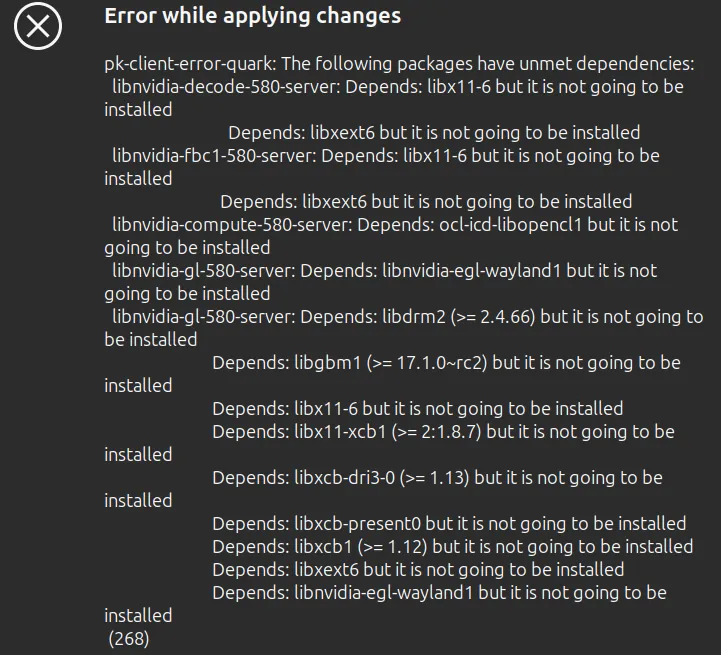
Selecting NVIDIA 595 in Software & Updates → Additional Drivers failed with PackageKit reporting dependencies similar to:
Error while applying changes
libnvidia-decode-580-server: Depends: libx11-6 but it is not going to be installed
libnvidia-fbc1-580-server: Depends: libx11-6 but it is not going to be installed
libnvidia-gl-580-server: Depends: libdrm2 but it is not going to be installed
libnvidia-gl-580-server: Depends: libgbm1 but it is not going to be installed
libnvidia-gl-580-server: Depends: libx11-xcb1 but it is not going to be installedThese messages make the problem look like Ubuntu is missing basic X11 libraries. In this case, those libraries were not the root cause. APT was being asked to solve conflicting NVIDIA driver metapackages while preserving an old CUDA-controlled driver dependency.
Why CUDA caused the NVIDIA 595 installation to fail
NVIDIA's CUDA packages separate the toolkit, runtime libraries, compiler, and display driver into many packages.
The important distinction in this case was:
cuda-toolkit-13-0contained and protected the CUDA 13.0 development toolkit.cuda-nvcc-13-0provided the CUDA compiler.cuda-cudart-13-0provided the CUDA runtime library.cuda-libraries-13-0andcuda-libraries-dev-13-0provided CUDA libraries.cudawas a small umbrella metapackage.nvidia-openwas a display-driver metapackage left by the original CUDA installation.
The installed nvidia-open package was version 580.65.06-0ubuntu1, but the actual Ubuntu 580 driver packages had already advanced to 580.173.02-0ubuntu0.24.04.1. apt-cache policy showed that nvidia-open was available only from the local dpkg status database, while the active driver packages came from Ubuntu's official security repository.
Removing cuda and nvidia-open removed only those two metapackages. It did not remove cuda-toolkit-13-0, NVCC, cuDART, or the CUDA libraries.
Step 1: Check the current NVIDIA driver and CUDA version
Check the active NVIDIA driver:
nvidia-smiCheck the installed CUDA compiler:
nvcc --versionBefore the upgrade, this system used NVIDIA 580.173.02 and CUDA Toolkit 13.0:
Cuda compilation tools, release 13.0, V13.0.48If nvcc is not found, CUDA may not be installed system-wide, or its bin directory may not be in your shell's PATH. Do not assume that this exact procedure applies until you inspect the installed packages.
Step 2: Confirm that dpkg is healthy and check multiarch
Audit the dpkg database:
dpkg --auditNo output normally means there are no unpacked or partially configured packages.
Check foreign architectures:
dpkg --print-foreign-architecturesOn systems using Steam, Wine, or other 32-bit applications, the output commonly includes:
i386Do not remove i386 merely because NVIDIA installs 32-bit libraries. Packages such as libnvidia-gl-595:i386 and libnvidia-compute-595:i386 are expected when multiarch is enabled.
Step 3: Find Ubuntu's recommended NVIDIA driver
Run:
ubuntu-drivers devicesThe test system reported:
driver : nvidia-driver-595-open - distro non-free recommendedYou may also see repeated warnings such as:
udevadm hwdb is deprecated. Use systemd-hwdb instead.Those warnings come from the current ubuntu-drivers tooling and do not mean NVIDIA driver detection failed. The relevant line is the driver marked recommended.
Ubuntu documents ubuntu-drivers as the recommended mechanism for detecting and installing packaged NVIDIA drivers. See the official Ubuntu NVIDIA driver documentation.
Step 4: Inspect installed NVIDIA packages
List installed 580 and 595 components:
dpkg -l | grep -E 'nvidia.*(580|595)'The affected system had the complete Ubuntu 580-open stack, including:
nvidia-driver-580-open
nvidia-dkms-580-open
nvidia-kernel-source-580-open
nvidia-utils-580
libnvidia-gl-580:amd64
libnvidia-gl-580:i386There were no installed 595 packages yet. This confirmed that the old driver itself was complete rather than half-installed.
Step 5: Compare the package sources and versions
Check where the metapackage, old driver, and target driver come from:
apt-cache policy \
nvidia-open \
nvidia-driver-580-open \
nvidia-driver-595-openThe important output was:
nvidia-open:
Installed: 580.65.06-0ubuntu1
Candidate: 580.65.06-0ubuntu1
100 /var/lib/dpkg/status
nvidia-driver-580-open:
Installed: 580.173.02-0ubuntu0.24.04.1
Candidate: 580.173.02-0ubuntu0.24.04.1
500 http://security.ubuntu.com/ubuntu noble-security/restricted
nvidia-driver-595-open:
Installed: (none)
Candidate: 595.84-0ubuntu0.24.04.1
500 http://security.ubuntu.com/ubuntu noble-security/multiverseThe /var/lib/dpkg/status entry with no active repository was the main clue: nvidia-open was an orphaned metapackage from the older CUDA installation, while the real driver was maintained by Ubuntu.
Check active NVIDIA, CUDA, or graphics-driver repositories:
grep -RhsE '^(deb |URIs:)' \
/etc/apt/sources.list \
/etc/apt/sources.list.d/ 2>/dev/null | \
grep -Ei 'nvidia|cuda|graphics-drivers'The only active NVIDIA source on the test system was:
https://nvidia.github.io/libnvidia-container/stable/deb/That repository belongs to NVIDIA Container Toolkit and was not providing the desktop display driver, so it did not need to be disabled.
If your output instead shows a CUDA driver repository under developer.download.nvidia.com/compute/cuda/repos/ or a local source under /var/cuda-repo-*, compare its candidate versions carefully. Mixing driver components from that source with Ubuntu's packages can produce a different conflict. For mixed-version overwrite errors, see our related guide: How to Fix NVIDIA Driver Unmet Dependencies on Ubuntu 24.04.
Step 6: Identify the CUDA packages that must remain
List the installed CUDA 13.0 packages and the old NVIDIA metapackage:
dpkg-query -W -f='${binary:Package}\t${Version}\n' | \
grep -E '^(cuda($|-)|nvidia-open)'Confirm that these important packages exist:
cuda-toolkit-13-0
cuda-nvcc-13-0
cuda-cudart-13-0
cuda-libraries-13-0
cuda-libraries-dev-13-0Now find installed packages that depend on nvidia-open:
apt-cache rdepends --installed nvidia-openOn the affected system, the only reverse dependency was:
nvidia-open
Reverse Depends:
cudaThis proved that removing nvidia-open would also remove the small generic cuda metapackage, but not the versioned CUDA Toolkit packages.
Do not confuse
cuda-driver-dev-13-0with the Linux display driver. Despite its name, it is a CUDA development package and should remain installed.
Step 7: Protect CUDA Toolkit 13.0 from autoremove
Mark the actual toolkit metapackage as manually installed:
sudo apt-mark manual cuda-toolkit-13-0APT may reply:
cuda-toolkit-13-0 was already set to manually installed.That is fine. It means the toolkit will not be treated as an unused dependency when the generic cuda metapackage is removed.
Confirm it:
apt-mark showmanual | grep '^cuda-toolkit-13-0$'Do not continue if cuda-toolkit-13-0 is absent and you need the CUDA development toolkit.
Step 8: Simulate removing the obsolete metapackage
Before changing anything, simulate removal:
sudo apt-get --simulate remove nvidia-openThe correct result for this package layout was:
The following packages will be REMOVED:
cuda nvidia-openOnly the two umbrella metapackages should be removed at this stage. If APT proposes removing cuda-toolkit-13-0, cuda-nvcc-13-0, cuda-cudart-13-0, or many unrelated packages, cancel and investigate before continuing.
Remove the two confirmed metapackages:
sudo apt remove cuda nvidia-openDo not run apt autoremove afterward.
Step 9: Simulate the upgrade to NVIDIA 595-open
Simulate the complete driver transaction:
sudo apt-get --simulate install nvidia-driver-595-openAPT should replace the 580 driver components with their 595 equivalents. It may also remove:
cuda-13-0
cuda-runtime-13-0Those are metapackages tied to the old driver arrangement. Their removal is acceptable provided the transaction does not remove the actual toolkit packages, including:
cuda-toolkit-13-0
cuda-nvcc-13-0
cuda-cudart-13-0
cuda-libraries-13-0
cuda-libraries-dev-13-0In the successful simulation, APT removed the 580 NVIDIA libraries and installed the corresponding 595 libraries for both amd64 and i386. It did not attempt to install 580-server or 595-server packages, and it did not remove GNOME, Xorg, or the Ubuntu desktop.
Step 10: Install NVIDIA 595-open
If the simulation is clean, install the recommended driver:
sudo apt install nvidia-driver-595-openReview the transaction one final time before pressing Y. A normal upgrade from this package layout removes the 580 driver stack and installs packages including:
nvidia-driver-595-open
nvidia-dkms-595-open
nvidia-kernel-source-595-open
nvidia-kernel-common-595
nvidia-firmware-595-595.84
nvidia-utils-595
libnvidia-gl-595:amd64
libnvidia-gl-595:i386
xserver-xorg-video-nvidia-595After installation, check whether DKMS built the new module:
dkms status | grep nvidiaAn installed entry looks similar to:
nvidia/595.84, 6.17.0-40-generic, x86_64: installedIf several kernels are installed, DKMS may list the NVIDIA 595 module for each one.
Do not worry if nvidia-smi fails before reboot or reports a driver/library mismatch. The running kernel may still have the old 580 module loaded while the filesystem already contains the new 595 libraries.
Step 11: Reboot and verify NVIDIA 595
Reboot once APT finishes without errors:
sudo rebootAfter logging in, verify the active driver:
nvidia-smiThe upgraded test system reported:
NVIDIA-SMI 595.84
Driver Version: 595.84
GPU: NVIDIA GeForce RTX 5060 TiXorg and GNOME Shell appeared in the process list, confirming that the graphical X11 session was using the GPU.
Verify the CUDA compiler:
nvcc --versionCUDA Toolkit 13.0 remained installed:
Cuda compilation tools, release 13.0, V13.0.48Finally, verify the kernel module:
cat /proc/driver/nvidia/version
dkms status | grep nvidiaAll three checks should agree on driver branch 595.
Why does nvidia-smi show CUDA 13.2 while nvcc shows CUDA 13.0?
After the upgrade, nvidia-smi displayed:
Driver Version: 595.84
CUDA Version: 13.2At the same time, nvcc --version displayed CUDA Toolkit 13.0. This is not a mismatch.
The CUDA version in nvidia-smi is the newest CUDA driver API level supported by the installed NVIDIA driver. It does not report which CUDA Toolkit is installed on disk. nvcc --version reports the compiler toolkit that will be used to build CUDA applications.
NVIDIA's CUDA 13.0 release notes state that CUDA 13.x requires an NVIDIA driver from branch 580 or newer and that later drivers remain backward compatible. Driver 595.84 can therefore run applications built with CUDA Toolkit 13.0.
Optional cleanup after successful verification
APT may report that the old 580 firmware is no longer required:
nvidia-firmware-580-580.173.02Once the system has rebooted successfully with driver 595, you can remove that exact obsolete firmware package:
sudo apt purge nvidia-firmware-580-580.173.02The exact old version may differ on your system. List remaining 580 packages before removing anything:
dpkg -l | grep -E 'nvidia.*580|libnvidia.*580'Avoid running an unreviewed apt autoremove. Preview it first:
sudo apt-get --simulate autoremoveOnly perform cleanup after confirming that the proposed package list contains nothing you still need.
Troubleshooting
APT still tries to install 580-server packages
Another installed metapackage is probably pulling the server driver branch. Check:
dpkg-query -W -f='${binary:Package}\t${Version}\n' | \
grep -E '^(cuda|nvidia|libnvidia)' | \
grep -E '(server|driver|open|cuda)'Also inspect reverse dependencies:
apt-cache rdepends --installed nvidia-driver-580-server
apt-cache rdepends --installed nvidia-driver-595-serverDo not force the transaction until you identify the package requesting the server branch.
The 595 DKMS module fails to build
Check the running kernel and install its headers:
uname -r
sudo apt install dkms linux-headers-$(uname -r)Then retry the module package:
sudo apt install --reinstall nvidia-dkms-595-openInspect the detailed DKMS build log if it still fails:
sudo find /var/lib/dkms/nvidia/595.84/ -name make.log -printThe exact DKMS version directory may differ after an update.
The NVIDIA module is blocked by Secure Boot
Check Secure Boot:
mokutil --sb-stateUbuntu may ask you to create a Machine Owner Key password during driver installation and enroll the key at the next reboot. If nvidia-smi cannot communicate with the driver after a successful DKMS build, check whether the module was rejected:
journalctl -k -b | grep -Ei 'nvidia|secure boot|module verification'CUDA commands disappear after the upgrade
Confirm that the toolkit packages remain:
dpkg -l | grep -E '^ii\s+cuda-(toolkit|nvcc|cudart|libraries)-13-0'Check the compiler path:
command -v nvcc
readlink -f /usr/local/cudaIf the packages are installed but the shell cannot find NVCC, add the CUDA binary directory to your environment according to the location used by your installation.
Final verification checklist
Run:
nvidia-smi
nvcc --version
dkms status | grep nvidia
dpkg --auditThe repair is complete when:
nvidia-smidetects the GPU and reports driver 595.nvcc --versionstill reports CUDA Toolkit 13.0.- DKMS reports the 595 module as installed for the active kernel.
dpkg --auditproduces no output.- GNOME/Xorg starts normally and uses the NVIDIA GPU.
Conclusion
The NVIDIA 595 installation failed because the system had two different package-management layers controlling the driver. Ubuntu maintained the working nvidia-driver-580-open stack, while the original CUDA installation had left the older generic nvidia-open metapackage behind. Additional Drivers could not reconcile that obsolete dependency cleanly and surfaced unrelated-looking X11 and 580-server dependency messages.
The safe fix was to protect cuda-toolkit-13-0, remove only the generic cuda and nvidia-open metapackages, simulate the driver transaction, and then install Ubuntu's recommended nvidia-driver-595-open package.
After rebooting, the RTX 5060 Ti ran successfully with NVIDIA 595.84, CUDA Toolkit 13.0 remained available through NVCC, and the open NVIDIA kernel module was installed through DKMS for every installed kernel.
Frequently asked questions
Does removing the cuda package uninstall CUDA?
Not necessarily. In this case, cuda was an umbrella metapackage. The real toolkit remained installed through cuda-toolkit-13-0, while NVCC, cuDART, and the libraries were provided by their own versioned packages. Always inspect the APT removal list because package layouts can differ.
Is NVIDIA driver 595 compatible with CUDA 13.0?
Yes. CUDA 13.x requires driver branch 580 or newer. NVIDIA drivers are backward compatible with applications built against supported earlier CUDA Toolkit releases, so driver 595.84 can run CUDA 13.0 applications.
Why did APT remove cuda-13-0 and cuda-runtime-13-0?
They were metapackages tied to the previous driver arrangement. The transaction did not remove cuda-toolkit-13-0, cuda-nvcc-13-0, cuda-cudart-13-0, or the CUDA library packages.
Should I install nvidia-driver-595 or nvidia-driver-595-open?
Use the package marked recommended by ubuntu-drivers devices for your GPU. On the tested RTX 5060 Ti system, Ubuntu recommended nvidia-driver-595-open.
Why does Additional Drivers mention 580-server on a desktop?
An older or transitional metapackage can cause APT to consider the server driver branch while resolving dependencies. That does not mean the desktop requires the server packages. Inspect installed metapackages and reverse dependencies before forcing installation.
Will removing nvidia-open break NVIDIA Container Toolkit?
It did not in this case. The active NVIDIA Container Toolkit repository provided container integration packages, while the host display driver came from Ubuntu. Containers use the working host NVIDIA driver; verify your own dependency transaction before removing packages.
Can I use this procedure on Wayland?
The APT and CUDA metapackage principles also apply on Wayland, but this exact procedure was tested with GNOME 46 on X11. Display-session troubleshooting can differ between X11 and Wayland.
- #upgrade NVIDIA 580 to 595 Ubuntu 24.04
- #NVIDIA driver 595 Ubuntu 24.04
- #nvidia-driver-595-open
- #keep CUDA 13
- #NVIDIA unmet dependencies Ubuntu
- #nvidia-open CUDA metapackage
- #Additional Drivers error Ubuntu
Comments (0)
Sign in to join the discussion
Sign in